We publish practical BIM articles for Archicad and Solibri users across the Nordics. Subscribe to Insights and get each new piece as it lands.
Solibri has replaced Office, Site and Anywhere with four tiers: Starter, Essential, Advanced and Premium, plus Security+ for environments without a network connection. There is no direct translation from the old products. The right tier depends on what each person on the project actually does in Solibri. Here is how to choose, and what happens when you convert an existing licence.
What has changed?
On 13 April 2026 Solibri launched its new tier model. At the same time, sales of Office, Site, Anywhere and CheckPoint ended. If you have a valid agreement, it still applies. When you are ready to move, you can convert your licences to the new tiers.
The biggest change is the way of thinking. You used to choose a product based on where you worked, in the office or on site. Now you choose a tier based on which functions each user needs for their role on the project.
The tiers at a glance
| Tier | Suited to | Includes, among other things |
|---|---|---|
| Starter | The team around the person who checks the models | Visual review of several IFC models, BCF issues, comments |
| Essential | The entry point to rule-based checking | Predefined rule sets, clash detection, measuring tools, BCF, connections to CDEs and Revit |
| Advanced | The person who checks the models and ensures quality | Own rules, Norwegian and Swedish adaptations, clash matrix, IDS, quantity and information take-off (QTO/ITO), Autorun |
| Premium | Organisations that standardise and automate | Central rule sets, company-specific extensions, point clouds, extended automation, AI support |
| Security+ | Environments that must be disconnected | Fully offline, no telemetry, controlled updates |
Choose by the work, not the price
Four questions are enough to find the right tier for each user. Answer for one person at a time, not for the whole organisation.
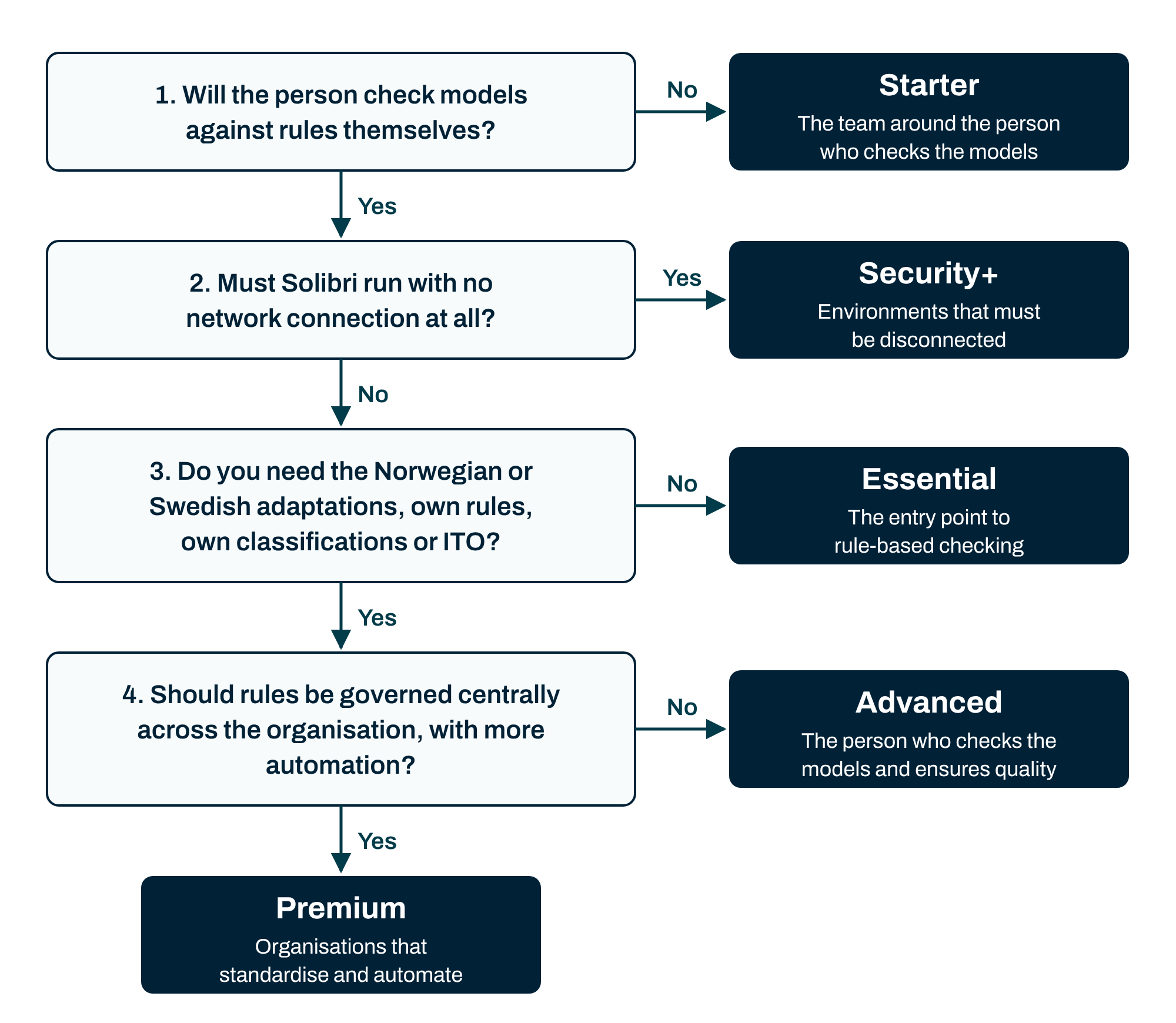
The third question is decisive for most Nordic users. The Norwegian adaptation and the Swedish rule sets require Advanced or Premium. The same goes for customising your own rules, classifications or ITO definitions. If you work to Norwegian or Swedish requirements, Essential is not enough.
With the Swedish rule set, for example, you can check that building elements and installation components are classified correctly according to BIP codes (bipkoder.se), or run a structured validation of the model before clash detection. The Norwegian adaptation comes with ready-made checks for Norwegian standards such as NS 3451, NS 3457-4, TFM and MMI, so designers and BIM coordinators can quickly find errors in both geometry and information and make sure information deliveries are complete.
How most teams combine tiers
You do not have to pick one tier for the whole organisation. Tiers and licence types can be combined freely. The most common setup among Norwegian and Swedish contractors is Advanced for the person who checks the models and Starter for the rest of the project team.
Organisations at the forefront with several Office licences often convert one of them to Premium. That gives them more automation and the integrated AI support in the Solibri ecosystem, while the others who check models work in Advanced.
Starter is for the team around the checker
Starter is not an entry tier for model checking. It is for the people who receive what the BIM manager or BIM coordinator compiles and shares on the project: site managers, project managers and designers who need to see the model, follow up issues and comment.
With Starter you can combine several IFC models for visual review, open and respond to BCF issues and follow up on what the checker has found. Rule-based checking, clash detection and IDS require Essential or higher.
Named or floating licence?
A named licence is tied to one person. A floating licence can be shared by up to five users, but only one at a time. Floating licences are available for Essential, Advanced and Premium. Starter and Security+ are only available as named licences.
Floating licences work exactly as before. You can borrow a licence and work offline for up to 14 days at a time before you need to reconnect to borrow it again. That suits people who work on site or travel.
Rule of thumb: whoever checks models every day usually gets the most out of a named licence. Users who need Solibri now and then can share a floating one.
From a legacy licence to a new tier
This is how a conversion works, for example from Solibri Office to Solibri Advanced:
-
Update first. Install or update to Solibri 26.4 or later. The new licence does not work in older versions.
-
Receive the new licence. After delivery you have a transition period of about one week in which the old licences still work. Use it to assign the new licences to the right users.
-
Keep working. Your own rule sets, classifications and saved projects are not affected by the conversion. They sit outside the licence and carry over unchanged.
Want to know what a conversion means for your licences? Get in touch and we will go through it together.
Frequently asked questions
Which new tier corresponds to Solibri Office?
There is no direct equivalent, because the tiers are built around roles and functions. Many Office users who check with their own rules or a local adaptation end up on Advanced.
Will there be downtime when we convert?
No, as long as you have updated to version 26.4 or later. The old licences keep working for about one week after the new ones are delivered.
Can we mix tiers in the same organisation?
Yes. You can combine tiers and licence types freely, based on what each user needs.
Is Essential enough for the Norwegian or Swedish adaptations?
No. The Norwegian adaptation and the Swedish rule sets require Advanced or Premium.
Can we work offline?
Yes. A floating licence for Essential, Advanced or Premium can be used offline for up to 14 days at a time. If you need a fully disconnected environment, Security+ is the right choice.
Next step
Moving to the new Solibri ecosystem means you can keep using Solibri with confidence and benefit from its continued development in quality assurance and model validation. Want help matching the right tier to the right person, or seeing what a conversion means for your licences? Talk to one of our Solibri specialists, or try Solibri for free together with a mini workshop.