In BIM-based design, each party or owns its own model, and other disciplines’ models are brought in as read-only references. For the architect this means two roles: your model is the foundation for the whole project, and the others’ solutions appear directly in your own design environment. This article describes how reference models move as IFC files through a common data environment. It also explains how the same federated set becomes the as-built model, which from 2026 onwards provides the input for Finland’s mandatory carbon footprint calculation.
What a reference model is
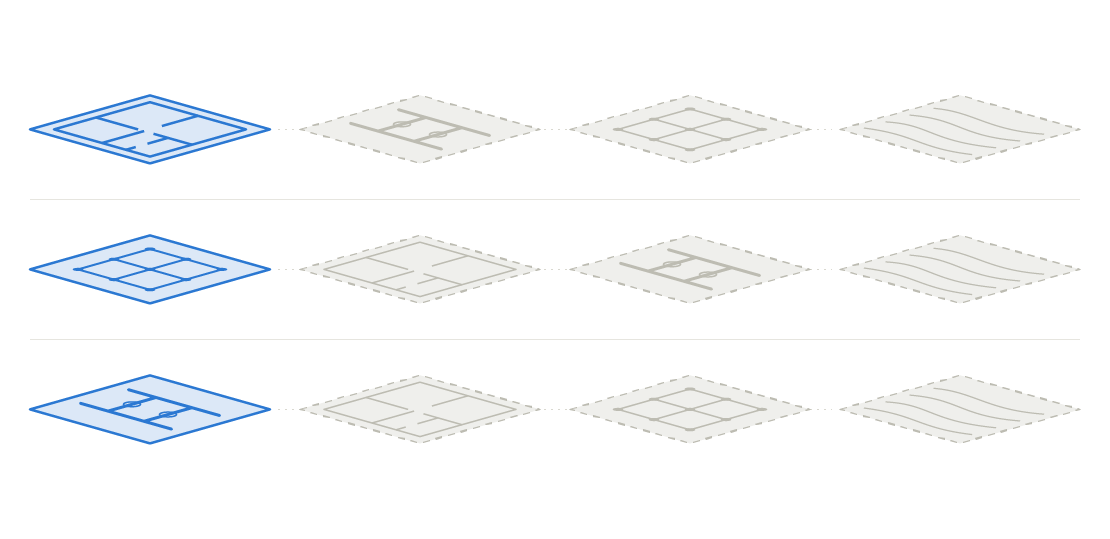
A reference model is another party's information model brought into your own design software as a read-only background – it is never edited. Each discipline has its own native model, which it maintains and is responsible for; the other disciplines' models appear in your own work as references.
The result is a federated model: the whole is assembled from separate models owned by different parties, not from a single shared file. The core principle is the division of responsibility: the architect is responsible for the content of the architectural model, the structural engineer for the structural model, and the MEP engineer for theirs. Reference models let everyone see the others' solutions without blurring ownership.
Overview: reference models and buildingSMART's Reference View
In openBIM, reference model practice has its own standardised exchange definition: buildingSMART's IFC4 Reference View. It is a Model View Definition (MVD) – a subset of the IFC schema – intended specifically for workflows based on reference models, where information flows mainly in one direction.
- The same principle as above. The recipient does not edit the model. Change requests, especially for geometry, go back to the model's author, in practice as BCF issues.
- Light, stable content. Building elements are exchanged as finished shapes and properties without parametric intelligence. Archicad, for example, omits wall and beam connection relationships from a Reference View export. This makes the model behave reliably across software.
- The most mature IFC4 view. buildingSMART describes the Reference View as the most stable and mature MVD in the IFC4 family (latest version 1.2). The IFC 4.3 version is defined to be backward compatible, and there is a software certification for it.
|
Model view |
Purpose |
Editing by the recipient |
|---|---|---|
|
IFC4 Reference View |
Reference models, coordination, quantities |
Not edited; changes go to the author |
|
IFC4 Design Transfer View |
Transferring design data for further work |
Elements can be edited within limits; not for round-trip exchange |
|
IFC2x3 Coordination View 2.0 |
Coordination between disciplines (predecessor to IFC4, still widely used) |
Mainly used as a reference |
In practice for the architect: share ARK.ifc as a reference model using the IFC4 Reference View export setting. Use the Design Transfer View only when the recipient is meant to continue editing the model. Agree the view in the project's modelling guidelines.
Looking ahead: buildingSMART is moving use-case-specific information requirements into IDS (Information Delivery Specification), and IFC5 is being built as modular. The principle behind the Reference View – a one-directional, read-only reference – remains the foundation of reference model work.
Sources: buildingSMART: MVD policy for IFC 4.x (2021), buildingSMART: Model View Definitions, buildingSMART: Reference View 1.2 specification, Graphisoft: Model View Definitions (Archicad 30).
Illustration: models, file formats and links
 Model links and file formats via the CDE
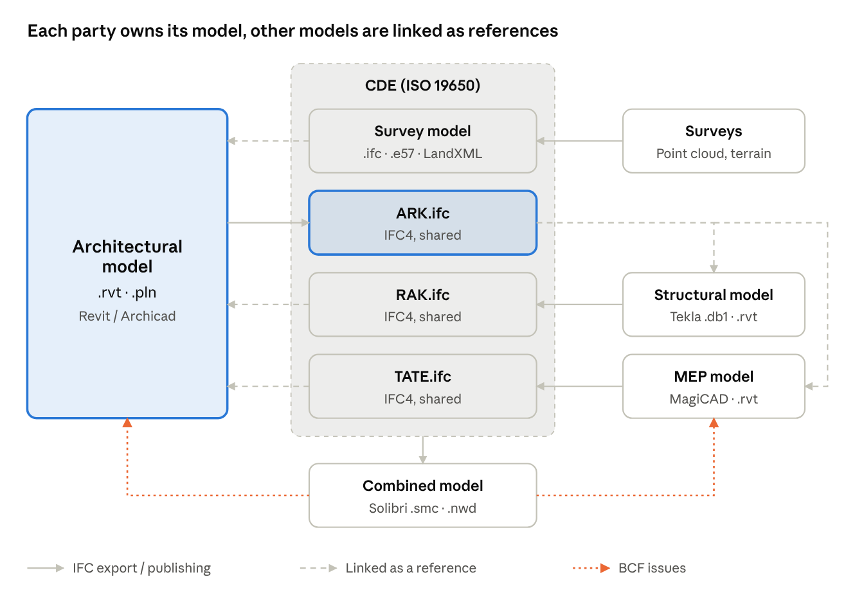
Each party exports its native model to IFC in the CDE. The architect links the survey model, RAK.ifc and TATE.ifc as references, and ARK.ifc is linked by the structural and MEP engineers. BCF issues from the combined model check go back to the model owners.
The architect's two roles
1. The architectural model is everyone else's reference
The architectural model is the project's central reference model, because the other designers build their work on it. The architect is therefore responsible for:
- Coordinate system and origin: the agreed shared survey point and height system (in Finland typically ETRS-GK and N2000). If these are wrong, every reference model lands in the wrong place.
- Storeys and levels: consistent names and elevations that the other models are tied to.
- Grids: often shared with the structural engineer.
- Spaces (IfcSpace): space data is input for MEP sizing and energy calculation.
- Information content: as agreed, for example per the Finnish Common BIM Requirements YTV 2012 (part 3, architectural design) and RAVA (the building permit requirements) and the project's own modelling guidelines.
2. The architect uses other models as references
The architect links into their own model, for example:
- survey and inventory models (terrain, existing buildings, current state of a renovation)
- the structural model (load-bearing structures, hollow-core slabs, beams)
- HVAC, plumbing, electrical and sprinkler models (ducts, pipes, plant rooms)
- infrastructure or landscape plans where needed.
Technical implementation and file formats
A reference model is brought in either natively or in the open IFC format. Shared files are exchanged through a common data environment (CDE, ISO 19650). Always reference a shared or published version, never a work-in-progress version.
|
Party / use |
Native format |
Shared format |
Linking as a reference |
|
Architect |
Revit .rvt, Archicad .pln |
ARK.ifc (IFC4) |
Revit: Link Revit / Link IFC; Archicad: Hotlink a IFC reference model |
|
Structural design |
Tekla .db1, Revit .rvt |
RAK.ifc |
Tekla Structures: Reference model |
|
MEP |
MagiCAD (.dwg / .rvt), Revit .rvt |
TATE.ifc |
Revit: Link IFC / Link Revit |
|
Survey data |
Point cloud .e57, terrain LandXML, .dwg |
.ifc, .e57, LandXML |
Point cloud and IFC linking |
|
Coordination |
Solibri .smc, Navisworks .nwd |
BCF issues |
All models as references in the combined model |
File names follow Finnish practice: ARK = architectural, RAK = structural, TATE = building services (MEP).
Good practice for architects
- Don't copy reference elements into your own model. Ownership and currency are lost. If copying is unavoidable (e.g. for drawing presentation), mark the copies clearly.
- Update references on the agreed schedule. Usually before a design meeting or coordination round. Check which version is in use.
- Publish your own model in a controlled way. Export IFC with the agreed settings, check it yourself before sharing and log the changes.
- Handle clashes with BCF. Clashes and questions are raised as BCF issues to the model owner; you don't fix someone else's model.
- Get the origin and storeys right from the start. Moving them late is expensive for everyone.
- Keep the model's purpose in mind. The architectural model's accuracy and information content must match what others use it for!
As-built model: Combining construction-phase choices and carbon footprint
The as-built model is assembled from the same discipline models as the design-phase combined model. The difference is that the models are updated to match what was built: the actual products, materials and quantities. The as-built model provides the input for the climate declaration and the construction product list required at the final inspection.
Why this is now mandatory in Finland
Under the Finnish Building Act, a new building whose building permit is applied for from 1 January 2026 onwards requires a climate declaration and a construction product list. Detached and semi-detached houses are exempt.
- Construction product list: prepared at the permit stage at least at main-drawing level, then updated to match the as-built state for the final inspection.
- Climate declaration (carbon footprint and carbon handprint) – prepared at the final inspection stage using as-built data.
- Limit values depend on building use. For example, the limit for apartment blocks is 16.0 kgCO2e/m²/a in 2026–2027 and 12.0 kgCO2e/m²/a from 2028. If the limit is exceeded, the building cannot be taken into use without changes or an exemption.
Building the as-built model step by step
- Carbon budget at the design stage. A baseline is calculated from the ARK, RAK and TATE model quantities using generic emission data (the Finnish national emissions database CO2data.fi). A main-drawing-level construction product list is prepared for the permit application.
- Product choices during procurement. When the contractor selects products, the manufacturer, product and its environmental product declaration (EPD, EN 15804) are recorded. If a choice changes the solution (e.g. a different frame material or insulation), the change is made in the owner's native model.
- Changes on site. As-built changes are updated into the models on an agreed schedule. Product data is attached to model elements as properties, and the link is kept through the IFC identifier (GUID). Site energy use and transport are recorded separately for the calculation.
- Assembling the as-built model. Each party publishes as-built versions of their IFC models to the CDE. They are combined as in the design phase, and the information content is checked (e.g. in Solibri): does every element that affects the calculation have a material and product data?
- Carbon footprint calculation. Quantities and product data are taken into an LCA tool following the Ministry of the Environment's assessment method. Product-specific EPDs replace generic values wherever the actual product is known.
- Final inspection and handover. The as-built construction product list and the climate declaration are submitted for the final inspection. The as-built model is handed over to the client for operation and maintenance.
The architect's responsibilities in the as-built model
- Build-ups as material layers. Walls, slabs and roofs are modelled with the correct material layers and thicknesses, so the quantities are usable for the calculation.
- Ready-made properties for product data. Agree from the start which properties hold the manufacturer, product and EPD reference. As-built data can then be added without rebuilding the model.
- Consistent classification (e.g. the Finnish Talo 2000 system) makes it easier to map quantities to the calculation and the construction product list.
- Tracking the carbon budget. The architect's choices (frame material, façades, space efficiency) have the greatest impact on the carbon footprint at the concept and scheme design stages. Run the calculation at every stage, not just at the end.
- Updating your own model. The architect updates their own elements to the as-built state. Other disciplines' changes come in through the reference models.
|
Stage |
Model |
Calculation data |
File formats |
|
Building permit |
Design models (ARK, RAK, TATE) |
Generic emission data, main-drawing-level construction product list |
IFC4, quantity take-off (.xlsx) |
|
Procurement and site |
Updated native models |
Manufacturer, product, EPD |
.rvt / .pln / .db1, EPD (PDF or digital) |
|
Final inspection |
As-built model (combined) |
Product-specific EPDs, actual quantities |
IFC4, .smc, climate declaration, construction product list |
|
Operation and maintenance |
Handed-over as-built model |
Product data for maintenance and circular economy |
IFC4 |
Sources: Rakennustieto: limit values and climate declaration status update (10/2025, in Finnish), Ministry of the Environment consultation on amending decree 1027/2024 (3/2026, in Finnish), One Click LCA: Building Act changes 2026 (in Finnish).
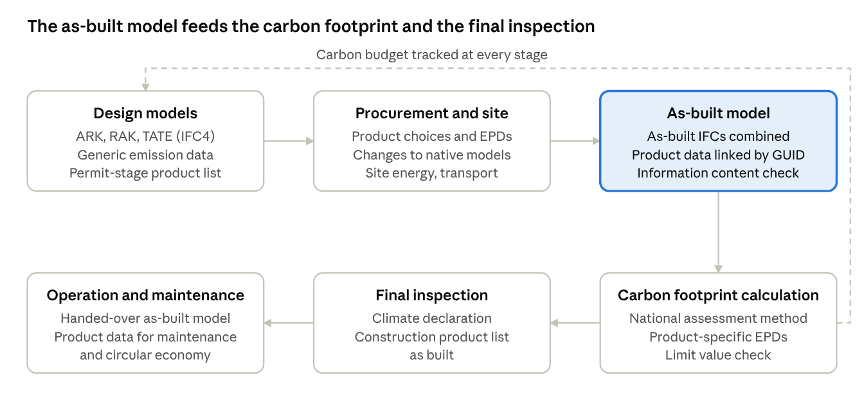 From design models to the as-built model and carbon calculation
The design models are updated during construction to match the products actually installed. The as-built model assembled from them provides quantities and product data for the calculation, and the result guides choices from the design stage onwards.
Why the concept matters
The reference model principle enables parallel design, a clear division of responsibility and automated coordination; without anyone having to hand over their native model for others to edit. For the architect it is both a responsibility – your model is the basis for everyone else – and a tool that brings the others' solutions straight into your own design environment.