Trimble released the SketchUp 2026.2 version at the end of May. In addition to fixes, the update brought a set of new features and improvements. Below is a summary of what's new. The next larger feature update to SketchUp is coming in autumn 2026.
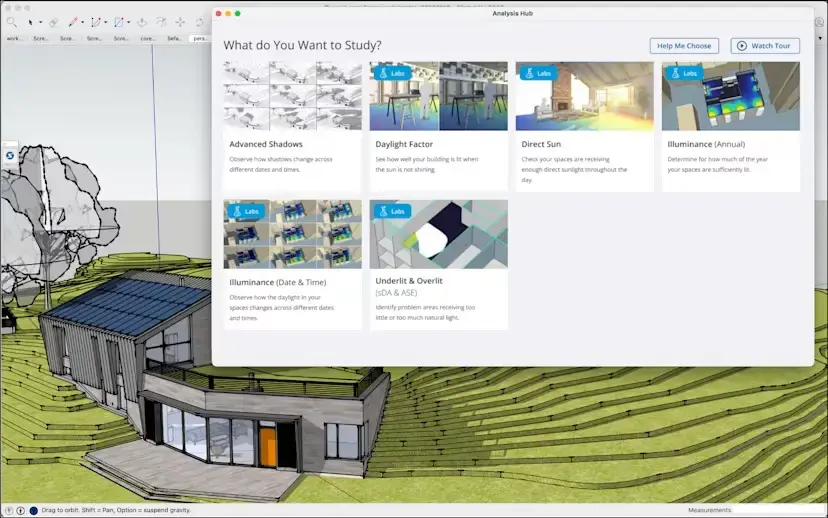
Analysis Hub: a new building analysis platform
Analysis Hub offers tools for analysing building conditions. Most of the functions are still Labs previews and continue to evolve, but the first finished piece of functionality is the shadow study tool Advanced Shadows, with which you can compare shading situations at different points in time. The analysis is carried out on Trimble's cloud server and enables efficient comparison of alternative solutions.
Watch a YouTube video in which the functions are introduced. Analysis Hub can be found in the Extensions menu.
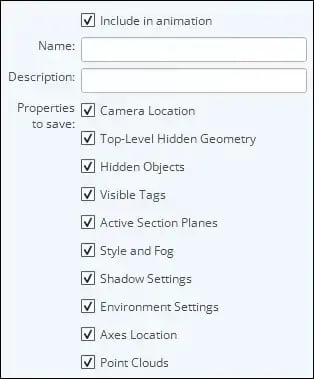
Point cloud settings in Scene management
The state of point clouds placed from Scan Essentials (SketchUp Studio, on Windows) is now saved in the properties of Scenes:
The Component search filters the model's components
Previously, the search in the Component panel performed searches directly from the 3D Warehouse; now it handles only the components in the model, and the 3D Warehouse opens from the button next to the search field.
Improvements to the AI services
The AI services underlying AI Render and AI Assistant have also been updated. Images are now generated by Google's Nanobanana, which has been one of the best image generators throughout 2026, and the technology behind AI Assistant's object generation has also been updated.
Improvements to LayOut: a new graphics engine
The new graphics engine, which has been available as a test feature for some time, is now finished and in use. Among other things, the presentation of text and line types is now clearer and graphics performance is generally better.
If, however, you notice problems, you can still switch back to the old graphics engine with the Window > Preferences > Performance > Graphics Engine selection. The same settings window also contains other settings that affect performance, which are worth trying if you find LayOut running slowly.
Clipping Mask cropping for groups as well
Clipping Mask cropping now also works on object groups, not just on cropping images and SketchUp views. With mask cropping you can easily and quickly produce various interesting page layouts. Do as follows:
First make a group of the parts to be cropped by selecting them and clicking Make Group in the context menu. Place the cropping object on top of the target and select Create Clipping Mask from the right mouse button context menu. The cropping can be undone with the context menu's Release Clipping Mask command.
Read the full version 2026.2 Release Notes on Trimble's site.