![nordicbim_logo.png]](https://www.nordicbim.com/hs-fs/hubfs/Imported%20images/nordicbim_logo.png?height=40&name=nordicbim_logo.png)
Groups and roles are one of the key differences between the commercial BIMcloud On-Premise and SaaS solutions compared to the limited Basic version. The Basic version is designed for small offices that do not collaborate (in Teamwork) with external partners. These offices often save on server costs by using workstation-level hardware, which is sufficient to run even a single Teamwork project. In such cases, the number of users is small, and there is no need for advanced role management or user groups.
In larger offices with multiple Teamwork projects, Archicad versions and external collaborators, the need for access control and permission management becomes clear. The full features are beneficial for all users, even in smaller but often networked offices. This article focuses on the benefits and efficient use of the full versions.
NOTE:
The company's Graphisoft account administrator or the administrator (masteradmin) who installed the BIMcloud On-Premise version has full access rights to everything by default. Therefore, Groups and Roles do not restrict them. By default, it is their responsibility to define these settings — otherwise, no one else will have access to anything.
Default Settings in Full Versions – Designed for Quick Onboarding
The key to simplicity lies in inherited settings. By default, BIMcloud is managed using built-in roles and groups that are designed to match typical responsibilities.
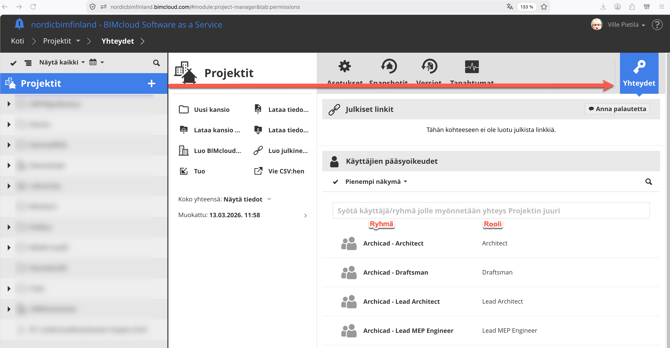
For example, when selecting the Projects – root folder of (similar to C: or Macintosh HD), the “Access- key-icon” panel shows how access rights are structured. The columns display default groups on the left and the roles assigned to those groups on the right. This approach ensures that permissions are assigned efficiently and consistently. And they are inherited from root to subfolders. Access rights (= roles) for all items (eg. folders) are assigned in the same way, either to groups or individual users.
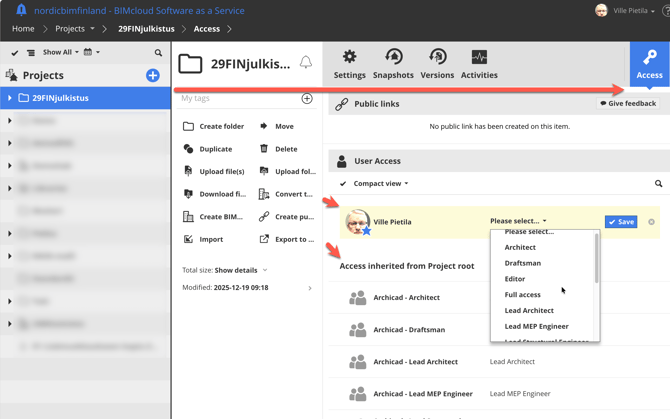
NOTE: Admin can be regognized from the "Sheriff" star-icon, don't place him to groups since he rules the BIMcloud already.
Easy BIMcloud SaaS Setup
This is why setting up a new BIMcloud SaaS environment is straightforward: simply assign users to groups, and everything works.
The two most important groups are:
- Archicad – Lead Architects
- Management – Project Administrators
These groups are designed to correspond to the user-level permissions available in the free Basic version. If all users in a small office are added to both groups, they will receive comprehensive access rights, as roles are cumulative.
Built-in Groups
There are built-in default groups for three main purposes:
- Archicad users
- Administrators – deputy Sheriff's should be Service administrators
- Viewers – practical for non-users, clients.
Groups marked with a lock icon are synchronized to BIMcloud SaaS from the Company's Graphisoft account. Adding Users

By default, the Lead Architect role does not include BIMcloud management permissions. This default is intentional, as not all users are familiar with—or need—the BIMcloud Manager web interface.
However, since the full version functions as a central project data and file repository and users may need to upload or download files, it is often necessary to grant them appropriate management permissions.
The most important Permissions and their purposes:
- Modify details
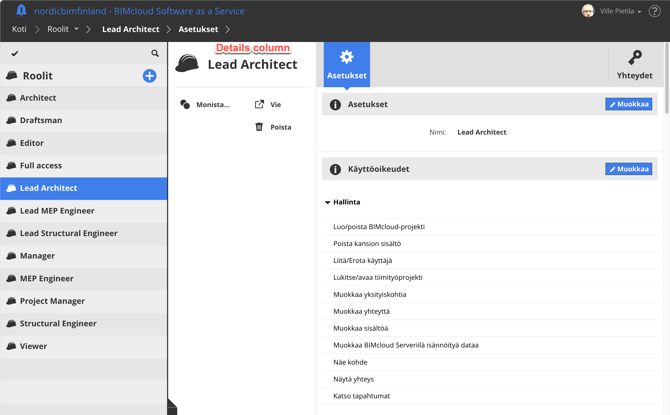
- Details enables user to see and use Details columns commands in all Managers pages
- Modify access – For key personnel who give access
- Modify content
- Note that for some actions user needs Modify Details+Modify content.
and
- View item – not everyone, especially Guest's needs to see the Users, Groups or Roles
- View access – not everyone needs to see the key's (Accesses)
- View activities – meant for Admin's or Big Brother's
NOTE:
Details column entails most important functions – in all BIMcloud managers parts.
About roles and related Permissions
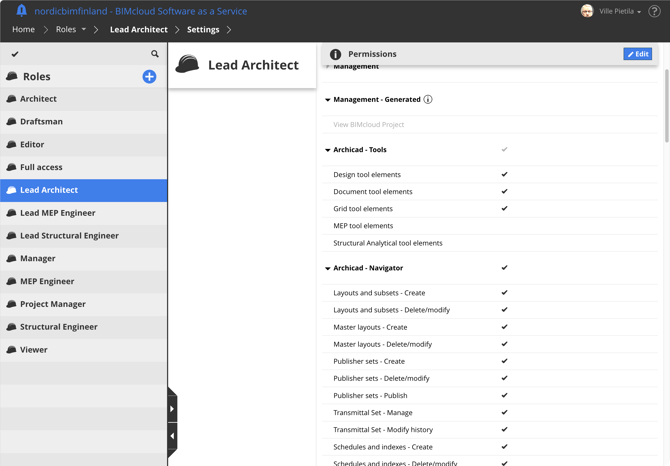
With the Roles permission sets it's possible to limit the Archicad functionalities available for User/Group. Most of them are quite self explanatory. One can even restrict user from saving a PLN, or creating Archicad to be a Viewer, preventing user to modify the model by sending changes.
As recommended in Archicad too, – don't edit default Groups /Roles, before You are sure what happens, but create a copy.