
What Are Archicad Expressions?
Expressions is a feature in Archicad that allow you to create custom calculation rules (formulas) for properties.
Instead of manually entering values, you can let Archicad:
-
Calculate areas, volumes, and lengths
- Generate cost calculations
- Create classifications automatically
-
Control parameters based on other values
- Dynamically combine text and numbers
It works much like formulas in Excel – but directly connected to BIM elements.
How Does It Work?
Expressions are created in the Property Manager and linked to a specific element type (e.g., walls, doors, windows, or objects).
An Expression consists of:
- A result field (e.g., Total Cost)
- A formula
- References to existing parameters
Example:
Wall Area * Cost_per_m2
Here, the wall area is multiplied by a cost per square meter value – automatically for every wall in the model.
Practical Example: Automatic Cost Calculation
Suppose you want to calculate the cost of all walls in a project.

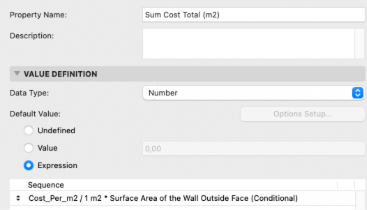
Steps:
- Create a new Property: Cost_Per_m2
- Create a new Property with the type Expression: Sum Cost Total (m2)
- Enter the formula:
a) Retrieve the parameter containing the wall cost
b) Enter the formula: / 1 m2 *
c) Retrieve the parameter for the wall area
Final formula example:
Cost_per_m2 / 1 m2 * Surface Area of the Wall Outside Face
Archicad will now automatically calculate the cost for each wall, which can then be displayed in Schedules.
Benefits of Using Expressions
- ReducedRisk of Errors
Manual calculations are eliminated – everything updates dynamically. - SmarterBIM Data
The model becomes richer in information and more useful for estimation, design, and facility management. - MoreEfficient Quantity Takeoffs
Perfect for cost estimation and early-stage budgeting. - Standardization
You can create company standards where calculations happen automatically in every project.
When Are Expressions Especially Useful?
- Cost estimation (5D BIM)
- Environmental calculations
- Classification according to BIM standards
- Project-specific rules
- Quantity takeoffs and schedules
Tips for Getting Started
- Start with simple multiplications
- Test your formulas in a small project
- Use clear and consistent Property names
- Document your Expressions for colleagues
Summary
Archicad Expressions are a powerful tool for creating intelligent, self-updating BIM models. By linking properties with formulas, you can automate calculations, improve data quality, and streamline workflows.
For architects and BIM coordinators who want to take the next step in digital design, Expressions are a feature that truly makes a difference.