![nordicbim_logo.png]](https://www.nordicbim.com/hs-fs/hubfs/Imported%20images/nordicbim_logo.png?height=40&name=nordicbim_logo.png)
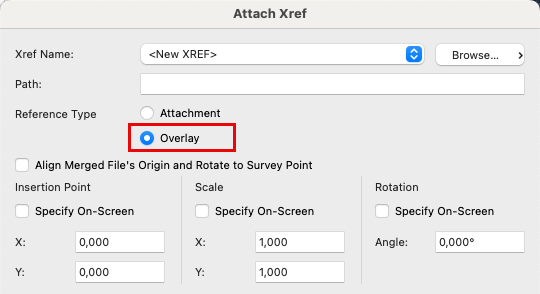
Attach X-ref
Only maps should be imported using the X-reft method. When doing so, use the overlay option during import.
The Overlay option ensures that Archicad does not search for other files that an AutoCAD user may have linked into their DWG file. Make sure that the file locations are on a shared server accessible to all users in the project. If Archicad cannot find the file, it will spend time searching for it.
Drawing Tool
For all other reference files, we recommend using the Drawing Tool to import/link DWG files. This makes both the file and the project much lighter and easier to manage compared to using the X-ref method.
Pay attention to the Update Type when inserting the drawing:
- Auto should be used if the file will undergo frequent changes and new versions during the project.
- Manual should be used if the file will rarely or never change.
If you are working with image files that do not need updating, we recommend using the Figure Tool (described below).
By enabling Use Drawing’s Internal Origin as Anchor, you ensure that the file’s origin point is used as the anchor. Click at the origin when placing the file to position it correctly with this option enabled.
Note: The cursor may appear to jump sideways, this is normal and not an error.
Layers can be controlled using the Embedded Layers function. These are not added to the Archicad file’s layer structure, helping to keep the number of layers down.
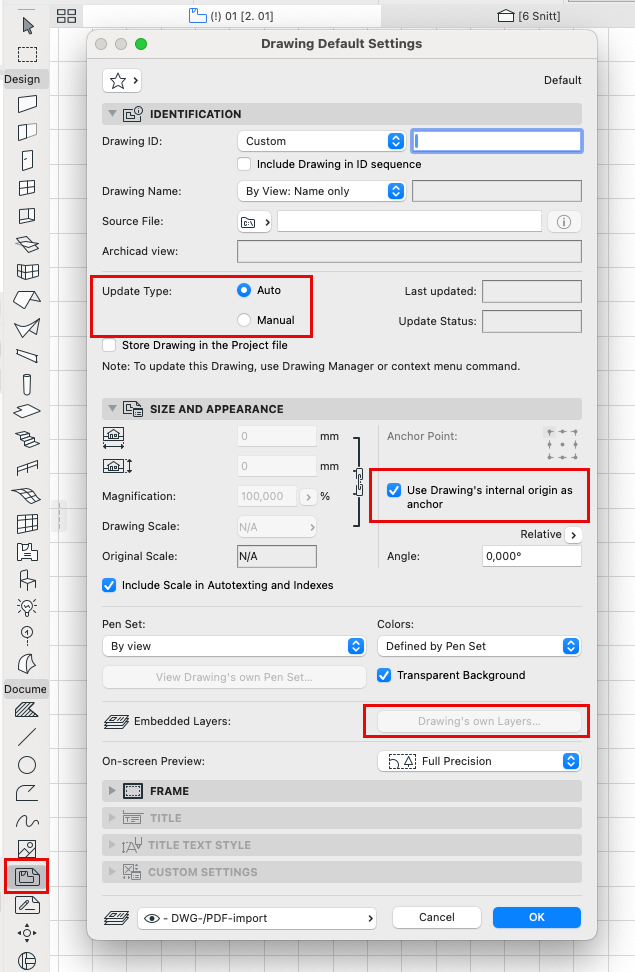
Figure Tool
Many users include image files in title blocks and layouts without considering file format or size. This can significantly increase the size of the Archicad file.
Images/logos intended only for drawing production (printing, plotting, or exporting to PDF) should be in JPG format with a maximum of 150–250 dpi.
Logos received from design agencies are often in TIFF format, which is uncompressed. Using these in Archicad increases file size proportionally to the number of instances.
For example: a 2 MB TIFF logo placed on 10 different Masters results in a 20 MB increase in the Archicad file size.
Use the Figure Tool, not the Drawing Tool, for images placed in drawings or layouts. Most images placed on a layout do not need to be linked files, and this avoids unnecessary complications with scale on layouts.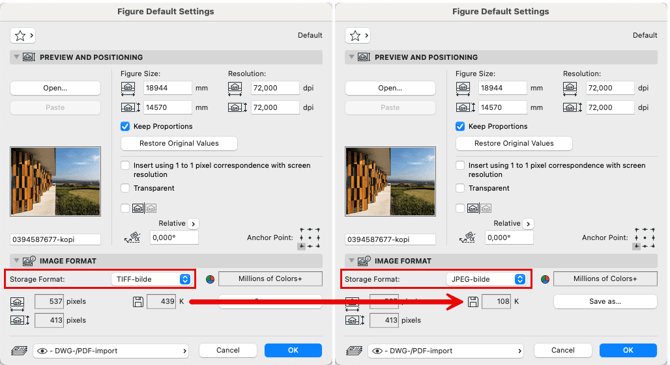
Example
With the Figure Tool, you can save files directly in other formats. In this example, a TIFF file is reduced from 1.2 MB to just 230 KB.
When many images and logos are used in Archicad files, this results in a significant reduction in file size.