![nordicbim_logo.png]](https://www.nordicbim.com/hs-fs/hubfs/Imported%20images/nordicbim_logo.png?height=40&name=nordicbim_logo.png)
Using multiple or one language version of Archicad (in the same computer)
It might be necessary to have multiple language versions in one computer. There are 27 localized Archicad versions.
Use cases:
-
if the user does’t speak Finnish language, but works here
-
if the office is working with projects and/or with team from abroad. In this case only one language Graphisoft library can be used in their teamwork project's.
-
If two Finnish office's work together and other one uses INT and other FIN. Also in this case only one language Graphisoft library can be used for shared project.
set Computer's regional settings to finland
If you need the input language to be primarily or alternatively Finnish you need to add it to Your operating system, if it's not there yet. This is necessary to enable using local alphabets (ä,å,ö…), in Archicad drawings and other daily tasks such as emails alike. Also a (physical) local (Scandinavian) keyboard is practical for input. Settings are different in Windows and Mac operating systems, and change from time to time.
Important details regarding Archicad Subscriptions and installation
The Archicad Collaborate-subscription that is sold in a certain market enables use of INT+local version, (in Finland FIN+INT), for Archicad Studio-subscription only one language is supported, in Finland INT or FIN. Same Archicad installation works as Collaborate or Studio depending on clients subscription.
By default all Archicad main versions (28, 29, …) install to the same Graphisoft - Archicad directory.
-
In Windows the default path is C:Program Files/Graphisoft/Archicad 29
-
In Mac Apps:Graphisoft:Archicad 29
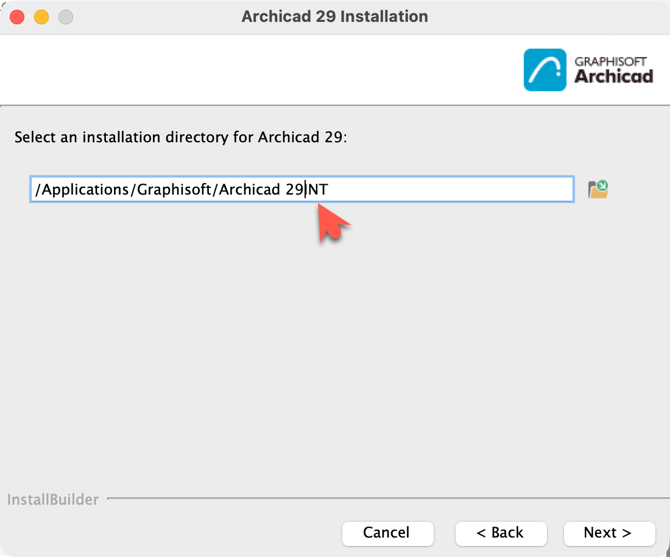
For example for Archicad 29, this means that if you have multiple versions of it, you need to specify another name for the other language versions install folder. Use for example Archicad 29 (for INT) and add Your custom folder for Archicad 29FIN for FIN (adding text to path creates a new folder). Or vice versa.
Note:
-
If you have several versions, you need to run the Update/Hotfix installers for each version! These are not always released simultaneously, so if You update INT, You may be incompatible with FIN for example for two weeks!
- You also need to install Library updates for both separately.
-
If you need to use add-ons, install and update them for all versions separately. You might need to show/browse path manually!
Change in template distribution for Archicad 28 and later versions
Archicad template file may be local, to meet the local design requirements, have local (metric/imperial) units, etc. For example, the Classifications, Properties, Layer names and many more settings vary from market to market. If You design abroad with Finnish version You need to know that Graphisoft has collected most of templates here.
Nordic BIM Group's Finnish local content
We distribute our free-of charge localized template, library and useful tools within the Nordic tools package, available here. Continuously updated instructions On-demand training are available here. The content is available in Finnish. Finnish template contains IFC-translator, which enables mandatory IFC-submittal for Building permit application in Finland. From the above site You find also the Finnish NBG Peruskirjasto with local Windows, Doors, equipment and other necessary objects.
Change in Graphisoft libraries for Archicad 28 and newer
In version 28 Graphisoft introduced so called Global library concept, called Libpacks. Set of separated smaller ”theme” packages which will be used from now on replacing Monolithic ones and supporting all the localized languages. Important information regarding both old Monolith and new Global-libraries here. Read also the Migration Guide chapter of Archicad Help. Note that links to Graphisoft Help require sign-in with personal GSID.
With Global library it's possible to use INT Archicad (Studio or Collaborate) with INT WITH FIN libpacks Or FIN with int libpacks
The Object's placed in projects are delivered with IFC models to Archicad users clients and officials. Since English isn't official language in Finland, this might be a problem. But if in the international project everybody speaks and reads English, then it's of course a bonus.
With Window menu's "Edit GDL Library parts"-Toolbars, Library localization preferences You can set libraries to support desired language version.


Also, if you receive a project which was created with another language version of Archicad 28 or later (using Libpacks), software will prompt asking if the localization should be changed. In other words this means changing for example the previously FIN library to use same language as current Archicad installation (INT). Or vice versa.
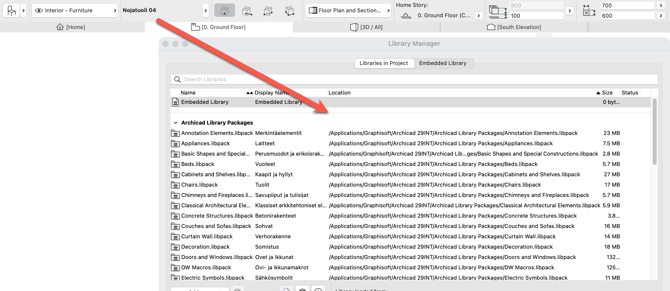
Result INT-libpacks Armchair 04 translated to it's Finnish equivalent Nojatuoli 04.