![nordicbim_logo.png]](https://www.nordicbim.com/hs-fs/hubfs/Imported%20images/nordicbim_logo.png?height=40&name=nordicbim_logo.png)
In this article, we provide tips on how to submit a feature request. Clearly presented and well-justified requests are the most successful.
Please consider the following when submitting a request:
• Check for similar ideas before adding your own request.
• The request must follow the Graphisoft Community guidelines.
• If you have multiple requests, submit each one separately.
• Present your idea clearly. Describe the idea or limitation in sufficient detail.
• Explain the goal of the request.
• Provide examples. Include specific examples, situation descriptions, and images.
• Explain the benefits. Describe the advantages and impact of the proposed solution.
• Present possible applications and use cases.
• Mention current workflows and their limitations.
• Pricing-related requests are not handled in this channel.
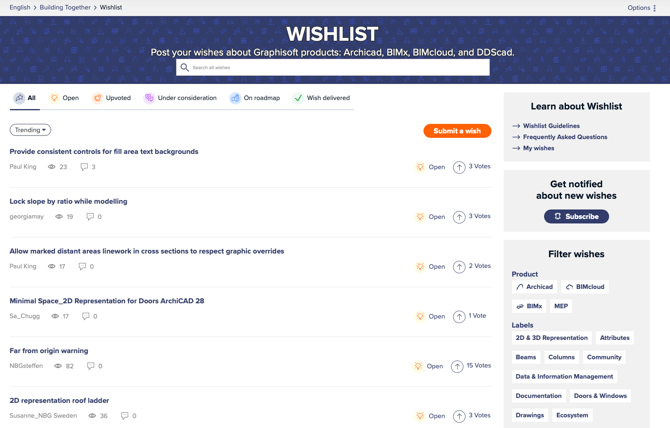
Tip: Give your request a clear and concise title so that readers can easily understand what they may be voting on.
On the Community pages, you can view other users’ requests, follow their progress, and vote on their importance. You can also subscribe to updates on new requests and see which requests are on the roadmap.
Status definitions

Open
A request that has been submitted by a user. Based on the number of votes* received within 6 months, it will either move to “Upvoted” status or be closed if it does not meet the required criteria.
Upvoted
A request that has reached the minimum number of votes* and receives the “Upvoted” status. Once a request reaches this status, the Product team will carefully evaluate it and update the status to either “Under consideration,” “On hold,” or “Closed.”
Under consideration
The Product team has reviewed the request based on feasibility and suitability before deciding whether to include it in the roadmap.
On roadmap
The request is added to the product development backlog either as a new item or as part of an existing item, depending on its potential scope.
Wish delivered
With the latest release, the request has been implemented in the relevant product or products and is now available to users.
On hold
The development of the request has been temporarily paused. Depending on the stage at which this occurred, it may later return to a previous status or be closed. Requests with this status can still be voted on.
Closed
The request has been closed because it did not meet the voting criteria or internal development standards and cannot be implemented in the foreseeable future. Requests with this status cannot be voted on.
Needs info
A new request that requires additional information before voting or consideration. This status remains for four weeks, after which the request will be closed if it has not been updated by the submitter.
*The minimum number of votes is 200.
Read more on the Graphisoft Community Wishlist pages.